Transit Alerts Software for Small and Mid-Sized Transit Agencies
A water main breaks on Main Street at 7:15 AM. Buses are detouring and riders are standing at stops that aren’t being served. Your dispatcher calls you. Now you need to post on Facebook, draft an email blast, update the website, text the city manager, and somehow get an alert into Google Maps – all while the phone is ringing with complaints from riders who had no warning.
TransitFare Transit Alerts eliminates that scramble. Create one alert in the dashboard. It publishes simultaneously to six channels: your GTFS-Realtime alert feed, your website, email subscribers, social media accounts, and SMS subscribers. Riders who subscribed to the affected route get notified automatically, while those on unaffected routes don’t get spammed.
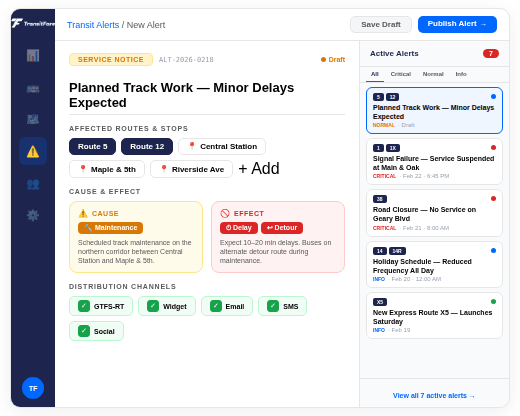
No hardware to install. Transit Alerts is a standalone SaaS product. Plans for every fleet size.
TRANSIT ALERTS OVERVIEW
What Are Transit Service Alerts?
Transit service alerts are official notices from a transit agency about detours, service disruptions, schedule changes, emergencies, or general information that riders need to know. The challenge for small and mid-sized agencies isn’t writing the alert. It’s getting it to riders across every channel they use, at the same time, before the disruption affects them.
Riders check different places. One opens Google Maps before walking to the stop. Another follows the agency on Facebook. A third subscribed to an email list months ago. Others rely on text messages because they don’t have a smartphone or a data plan. And plenty just visit the agency website. A transit service alert that only reaches one of these channels misses most of your ridership.
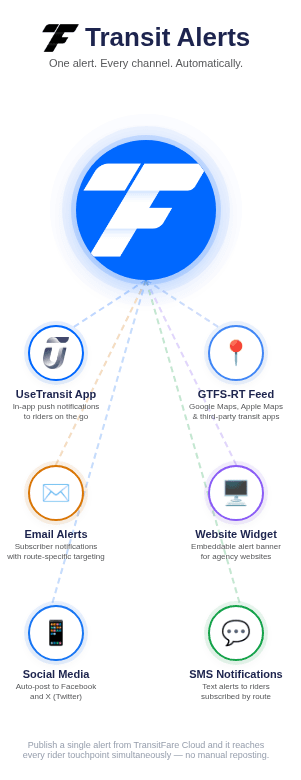
TransitFare Transit Alerts is transit alert software that publishes a single alert to six channels simultaneously: a GTFS-Realtime alert feed (so alerts appear in Google Maps, Apple Maps, and Transit App), an embeddable website widget, email subscribers, social media accounts, SMS, and the UseTransit rider app. One alert created by one staff member reaches riders on the apps they already use, in their inbox, on their phone, and on your website.
THE PROBLEM WITH TRANSIT ALERTS
Getting Alerts to Riders Shouldn't Take 45 Minutes
Transit operations teams face two alert scenarios, and both are broken.
Emergency alerts under pressure.
A bus breaks down or a road closure forces a detour. The dispatcher or transit director has minutes, not hours, to inform riders before complaints start. But “inform riders” means logging into Facebook, drafting an email, contacting whoever manages the website, and hoping the person responsible for the GTFS feed is available. Each channel is a separate login, a separate workflow, and a separate chance for something to fall through. The channels that get updated depend on who’s available, not on which channels riders are actually checking.
Scheduled alerts across teams.
A planned detour starts next Monday. Operations knows the details. Your web team needs to update the site. Comms needs to schedule social media posts. Someone else drafts the email blast. Each person works on their own timeline. Social media goes live Thursday. The website isn’t updated until Monday morning. Email goes out Monday afternoon. Riders who checked the website Friday saw nothing. Those who checked Facebook Monday saw stale information from last week. Nobody updated the GTFS-Realtime alert feed because nobody on staff knows how.
Every channel your agency uses to reach riders is disconnected from every other channel. And none of them are connected to transit-specific information: routes, stops, schedules, and the GTFS data standard that powers trip planning apps. TransitFare Transit Alerts connects them all.
Deploy in weeks, not years. Transit Alerts is SaaS. No hardware, no vehicle installations, no IT projects. Your agency can be publishing alerts across all six channels within days of signing up.
HOW IT WORKS
One Alert. Six Channels. One Dashboard.
STEP 1
Create the alert.
Select the affected routes and stops. Choose the alert type: detour, service disruption, schedule change, general notice, or emergency. Set the start and end time, or mark it “until further notice.” Write the alert text.
STEP 2
Publish.
One click. The alert pushes to every channel you’ve configured: GTFS-Realtime, website widget, email, social media, and SMS. All six channels receive the same information at the same time.
STEP 3
Riders see it everywhere.
Riders see your alert regardless of what app, platform or device they use – whether it’s in Google Maps, as an SMS, on your website, or in their Instagram feed.
STEP 4
Resolve.
When the disruption ends, resolve the alert in the dashboard. The GTFS-Realtime feed updates. Your website widget clears. Subscribers who were notified see the resolution. Done.
Alert history and reporting are logged automatically. Every alert your agency has ever published is archived with timestamps, channels used, and affected routes. That documentation is useful for board reports, FTA compliance reviews, and after-action analysis.
One staff member. One dashboard. All six channels. Transit Alerts eliminates the coordination between operations, web, comms, and IT. The person who knows about the disruption is the person who publishes the alert.
GTFS DATA PUBLISHING
SIX CHANNELS
Where Your Transit Service Alerts Go
GTFS-Realtime
TransitFare generates an Alert to your GTFS feed file. When you publish an alert, it appears in Google Maps, Apple Maps, Transit App, Moovit, Citymapper, and every trip planning platform that consumes GTFS-Realtime data. Most small agencies are missing this channel entirely – and it reaches the most riders because it meets them inside the app they already use to check bus times.
Website Alert Widget
An embeddable widget for your agency’s public website. Drop it into any page. It auto-updates when alerts are created, modified, or resolved. After the initial embed, no IT involvement is needed. Riders who visit your website see active alerts immediately without navigating to a separate page.
Email Alerts
Riders subscribe through the web widget or UseTransit portal and choose which routes and stops they care about. When an alert affects Route 5, only Route 5 subscribers get an email. System-wide subscribers get every alert. No generic blast that trains riders to ignore your emails.
Social Media Publishing
Transit Alerts publishes to your agency’s own Facebook, Instagram, and X accounts. Your branding, your audience, your accounts. The “bring your own keys” model means your agency connects its own social accounts and TransitFare publishes through them. No third-party branding appears anywhere.
SMS Alerts
Text message (SMS) notifications to subscribed riders, filtered by route and stop. Delivered on TransitFare’s own dedicated CTIA-compliant transit shortcode (US) and longcode (Canada) for high delivery rates and carrier trust. Available as an add-on to any plan.
UseTransit App & Portal
The UseTransit app and web portal display alerts for subscribed routes in-app, alongside trip planning and arrival times. This is the channel your agency fully owns: your routes, your alerts, your rider relationships.
Six channels, one source of truth. Every channel receives the same alert text, the same affected routes, and the same resolution time. No discrepancies between what Facebook says and what your website shows.
GTFS-REALTIME ALERTS
Put Your Transit Service Alerts in Google Maps and Apple Maps
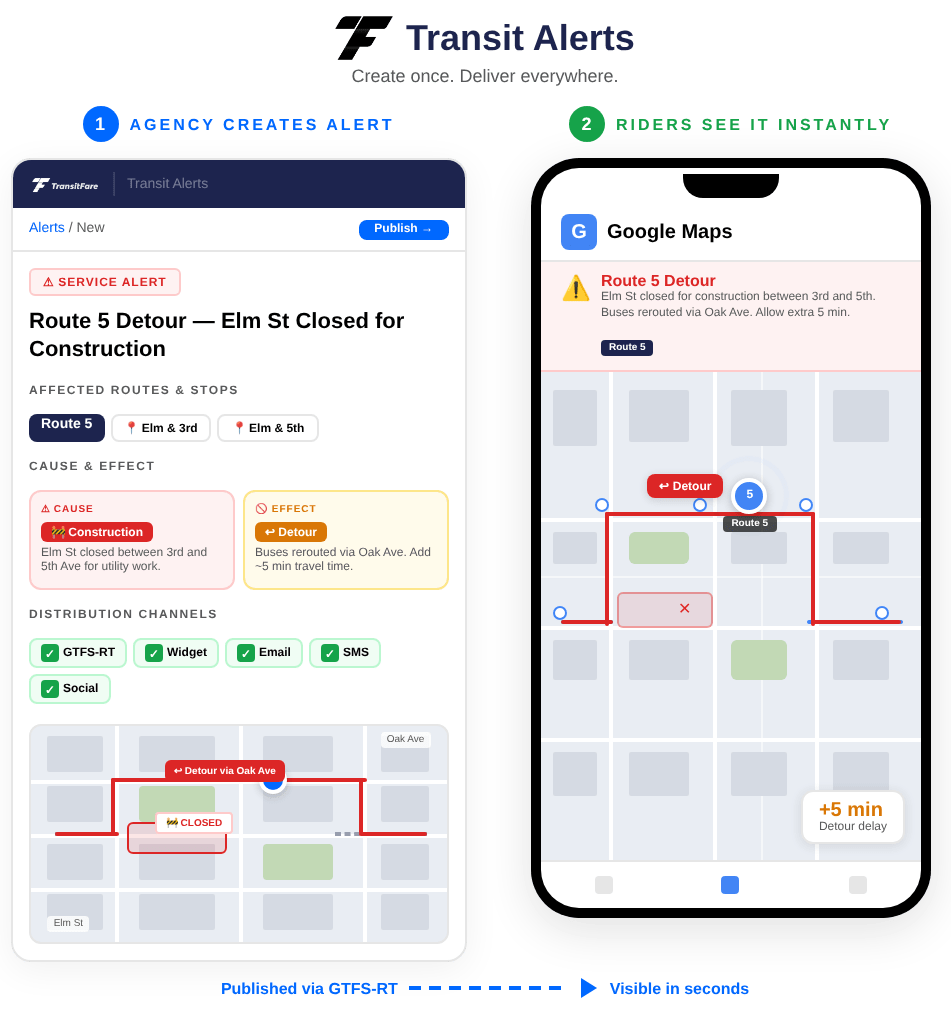
When a rider opens Google Maps and checks your bus route, they should see your service alerts. A detour should show on the route. A service suspension should be visible before the rider walks to the stop.
For most small agencies, that doesn’t happen. The agency may publish a GTFS schedule (so routes appear in Google Maps) and may even publish GTFS-Realtime vehicle positions (so live bus locations appear). But the third GTFS-Realtime feed, alerts.pb, the service alerts feed, is almost never published. Riders see your buses in real time but have no idea that Route 5 is on detour or that Saturday service is cancelled.
Transit Alerts closes that gap. Every alert you create in the dashboard generates a standards-compliant GTFS-RT alerts entry in your alerts.pb feed. Trip planning apps pick it up automatically.
TWO SCENARIOS, DEPENDING ON YOUR AGENCY’S GTFS SETUP:
Already publishing GTFS-Realtime?
Your agency publishes vehiclePositions.pb and tripUpdates.pb from a CAD/AVL vendor. Transit Alerts generates only the alerts.pb feed. Add the feed URL to your existing configuration. Your other feeds are untouched.
No GTFS-Realtime at all?
TransitFare Cloud can generate your complete GTFS dataset, both schedule and real-time. Transit Alerts becomes the entry point for putting your agency on Google Maps entirely, not just for alerts.
TransitFare generates and publishes GTFS data for agencies across the US and Canada. Transit Alerts adds the alerts.pb feed to that proven pipeline.
SMS ALERTS
SMS Transit Alerts - No App, No Data Plan, No Barriers
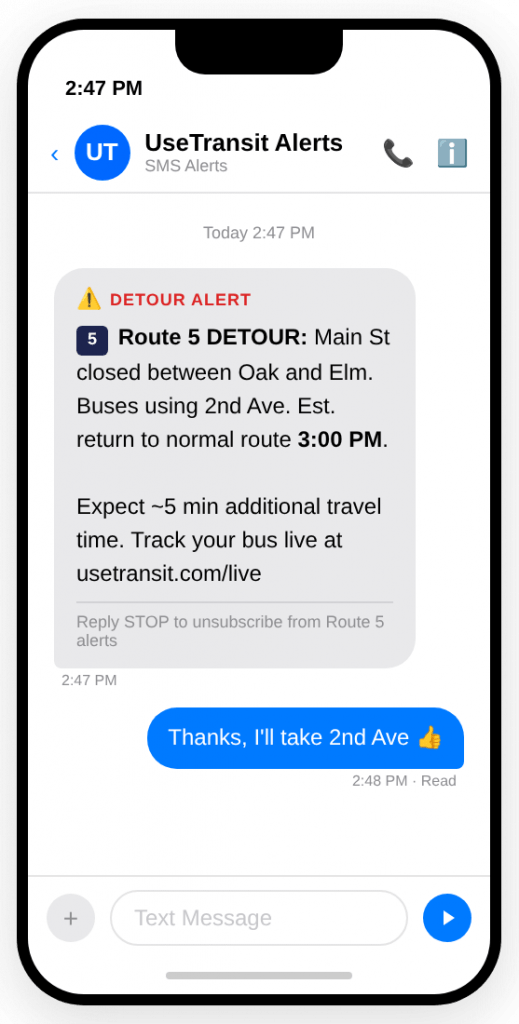
Many riders don’t have a smartphone. Others lack a data plan. And plenty don’t check email or follow your agency on social media. For the riders who depend on your service the most – including older adults, low-income commuters, and riders in areas with limited cellular data coverage – a text message is the most reliable way to receive a transit service alert.
TransitFare’s SMS Alerts channel delivers text message notifications to riders who subscribe to specific routes and stops. A rider texts a keyword to your agency’s dedicated number and selects which routes they want to hear about. When a disruption hits their route, they get a text. Disruptions on unrelated routes stay silent.
CTIA-compliant messaging on a dedicated transit shortcode.
TransitFare operates its own dedicated transit shortcode in the United States and longcode in Canada. Unlike shared shortcodes bundled with marketing messages from dozens of other companies, a dedicated number means higher delivery rates, lower spam filtering risk, and full compliance with CTIA messaging guidelines – including opt-in confirmation, opt-out handling, and message frequency disclosure. Carriers recognize dedicated transit shortcodes as legitimate service communications, not promotional spam.
Subscription management is rider-controlled.
Riders subscribe and unsubscribe by text. They can also manage their SMS preferences through the web widget or UseTransit portal. STOP to unsubscribe works immediately, as required by CTIA guidelines. No staff time is required to manage the SMS subscriber list.
SMS Alerts is available as an add-on to any Transit Alerts plan. For agencies where SMS is a critical accessibility channel – particularly those serving communities with lower smartphone adoption – this module ensures no rider is left without a way to receive service information.
RIDER SUBSCRIPTIONS
Smart Route Subscriptions - Riders Choose What Matters
Generic notification tools send the same blast to every subscriber. A rider who only takes Route 5 to work gets alerts about Route 12 construction, Route 8 schedule changes, and a system-wide snow day — all in the same inbox. After a few irrelevant messages, they unsubscribe.
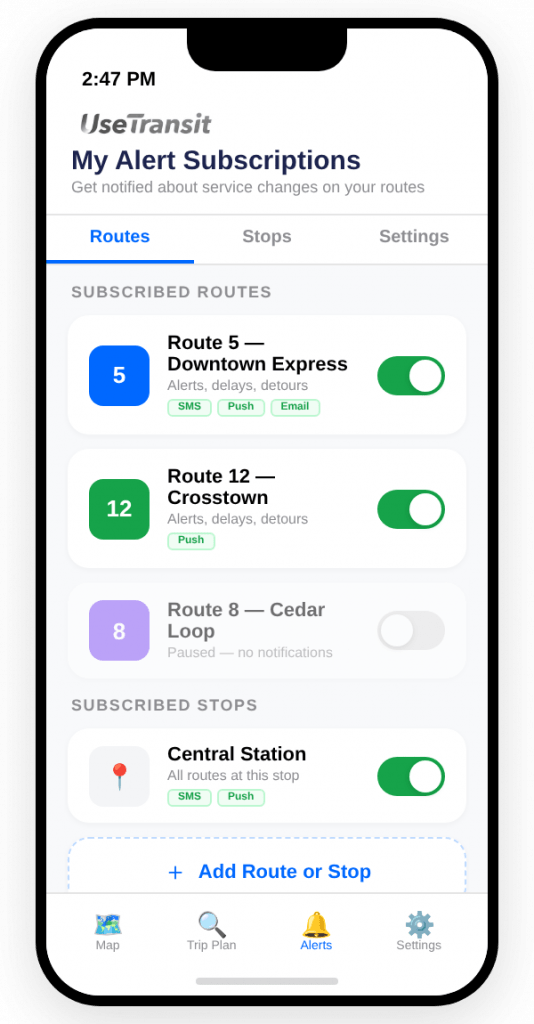
Smart Route Subscriptions work differently. Riders subscribe to the specific routes and stops they use. They choose how they want to be notified: email, SMS, or both. An alert affecting Route 5 goes to Route 5 subscribers. Route 12 subscribers hear nothing.
That level of targeting is transit-native intelligence that no generic transit notification system or municipal communication tool can replicate. A mass email platform doesn’t know what a route is. A social media scheduler doesn’t understand GTFS stop IDs. Transit Alerts does, because it was built as transit communication software from the ground up.
Subscription management is available through the embeddable web widget on your agency’s website and through the UseTransit app and portal, and SMS. Riders manage their own preferences. No staff time required to maintain subscriber lists or segment audiences.
STANDALONE PRODUCT
A Standalone Product. Not a Platform Add-On.
Transit Alerts is not a feature bundled inside a larger platform. It is a standalone SaaS product that your agency can purchase, deploy, and use within days.
Your vehicles don’t need new hardware. The agency doesn’t need to adopt a fare collection system or commit to a CAD/AVL platform. Transit Alerts connects to your existing GTFS data (or generates it), connects to your existing social media accounts, and starts publishing alerts on day one.
This matters because most transit alert capabilities on the market are locked inside enterprise platforms. To get alert publishing across GTFS-Realtime, email, social media, and your website, your agency would need to buy an entire ITS suite: fare collection, tracking, analytics, and hardware – all from one or more vendors. For a 25-bus agency that already has fareboxes from another manufacturer and a CAD/AVL system that works fine, that path doesn’t make sense.
Transit Alerts is the realistic path. Deploy it this month. If your agency decides to add TransitFare’s CAD/AVL, fare collection, or automated passenger counting later, Transit Alerts integrates with all of them through TransitFare Cloud, and over 90% of TransitFare customers expand to additional modules after their initial deployment. But none of that is required. Transit Alerts stands on its own.
Starter
1-15 vehicles
Standard
16-50 vehicles
Fleet
51+ vehicles
All features included in every plan. Tiers differ by fleet size, email subscriber capacity, and support level. SMS available as an add-on.
Average deployment time for Transit Alerts: days to weeks.
WHY TRANSITFARE
Trusted by Transit Agencies Across North America
Transit-native, not adapted from a generic tool.
Transit Alerts understands routes, stops, GTFS, and rider subscriptions. Generic municipal notification platforms send the same blast to everyone because they don’t know what a bus route is. Transit Alerts sends Route 5 alerts to Route 5 riders. That’s the difference.
Standalone. Buy exactly what you need.
No hardware, no platform commitment, no bundled products. Transit Alerts works on its own, and it works alongside equipment and systems from other vendors. Your agency keeps its existing fareboxes, its existing CAD/AVL, and its existing website CMS.
Built for agencies your size.
TransitFare has served small and mid-sized transit agencies since 2012. The platform, the support model, and the pricing are designed for a transit director running 10 to 50 vehicles with a small team — not an enterprise with a dedicated IT department. Nearly 600 vehicles run on TransitFare today, and the system has recorded zero unplanned downtime in three consecutive years.
About TransitFare Transit Alerts
TransitFare Transit Alerts is a standalone transit alert software product that publishes service alerts simultaneously to six channels (GTFS-Realtime alert feed/alerts.pb, embeddable website widget, email subscribers, social media including Facebook/Instagram/X, and SMS) from a single dashboard. Built for small and mid-sized transit agencies, Transit Alerts requires no hardware installation and no other TransitFare products.
Smart Route Subscriptions allow riders to subscribe to alerts for specific routes and stops through the UseTransit app and web portal, receiving only the alerts that affect their commute. The GTFS-Realtime alert feed generates a standards-compliant alerts.pb file that makes service alerts visible in Google Maps, Apple Maps, Transit App, Moovit, and every trip planning platform that consumes GTFS-Realtime data.
SMS Alerts operate on a dedicated CTIA-compliant transit shortcode in the United States and longcode in Canada, ensuring high delivery rates and carrier trust. Agencies already publishing GTFS-Realtime vehicle positions and trip updates can add the alerts.pb feed alongside existing feeds; those with no GTFS can use TransitFare Cloud to generate the complete dataset.
Plans are available in three tiers sized by fleet: Starter (1–15 vehicles), Standard (16–50 vehicles), and Professional (51–150 vehicles), with all features included in every tier and SMS available as an add-on.
Founded in 2012, TransitFare currently powers nearly 600 transit vehicles, publishes multiple GTFS schedule and realtime feeds, manages 344 routes and 6,100+ stops, and has maintained zero unplanned downtime since 2023. The platform is deployed across the United States and Canada with products available to transit agencies internationally.
See How Transit Alerts Works for Your Agency
Schedule a demo and we’ll walk you through the Transit Alerts dashboard, create a test alert, and show you exactly how your service alerts appear in Google Maps, on your website widget, and in a rider’s inbox. Already publishing GTFS? We’ll show you how the alerts.pb feed slots alongside existing data. Starting from scratch? We’ll show you how to get there.
Or call us:
1-877-993-0001